

Your busiest hours aren’t always your most productive. Protecting deep work blocks for executives starts with reserving your clearest-energy periods for important thinking, then arranging meetings and responsive tasks around them. A planned calendar can create room for focused work without taking over the time you need outside work.
Urgent requests and meetings can make even a carefully planned day hard to maintain. This guide explains how time blocking can support focus and work-life balance, how to plan around your energy, and how to set practical boundaries that protect focused periods. You’ll also learn how structured operational support can help make a more manageable rhythm easier to sustain.
Key Takeaways
- Build a weekly template that gives focused work, meetings, routine tasks and recovery time their own place.
- Use calendar blocks to plan specific priorities, while leaving room for transitions and unexpected requests.
- Match demanding work to the hours when your concentration is strongest, and protect those periods with clear boundaries.
- When scheduling and follow-ups start crowding out strategic work, structured operational support can help restore a steadier rhythm.
1. What is time blocking and how does it better enable deep work?
Deep work means sustained concentration on demanding tasks, such as shaping strategy or solving complex problems. For executives, it creates space for decisions that need careful thought, rather than fragmented attention between messages.
Time blocking assigns periods to specific types of work. A weekly template can separate deep work, routine tasks, meetings, buffer time and breaks. For example, group routine approvals into a responsive-work window, then reserve other periods for strategic planning and team discussions.
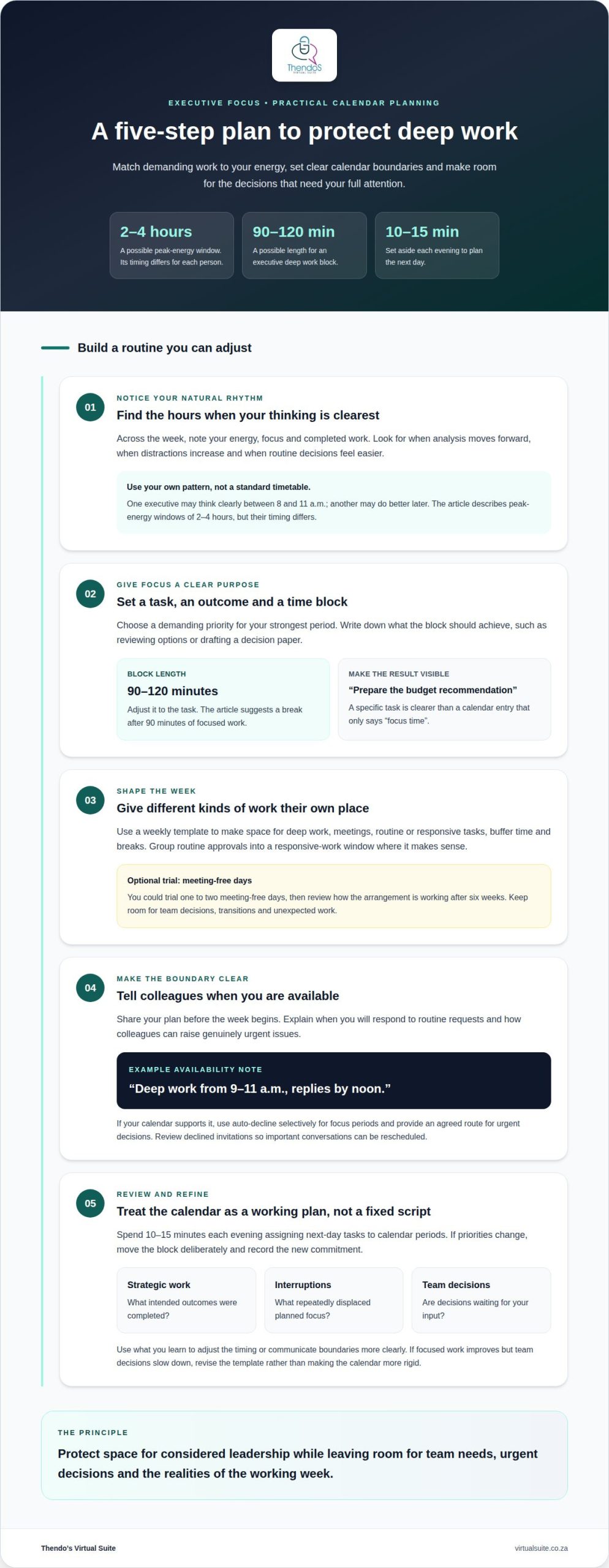
An executive deep work block can last 90-120 minutes, depending on the task. A demanding analysis may need that uninterrupted span, followed by a break after 90 minutes of focused work. The block should have a clear outcome, such as reviewing options or drafting a decision paper.
Share the plan with your team before the week begins. Explain how colleagues can raise urgent issues and when you’ll respond to routine requests. You could trial one to two meeting-free days, then review how the arrangement is working after six weeks.
Blocking too much time can delay decisions and leave no room for unexpected work. Keep space for meetings, responsive tasks and transitions instead of treating every open period as unavailable.
Track completed strategic deliverables, interruptions and decisions awaiting your input to assess the effect. Compare these outcomes with the week’s priorities, then adjust the template if focused work improves but team decisions slow down.
2. Time blocking as a calendar-based planning method
Give each calendar block a task and an intended result. “Prepare the budget recommendation” is clearer than “focus time” because it shows what the period is for and what progress looks like. This also helps distinguish a genuine priority from an open slot that could otherwise become another meeting.
Plan the next day by spending 10-15 minutes each evening assigning specific tasks to calendar periods. For instance, place a decision memo in a block before its discussion, then schedule follow-up actions after the meeting. This keeps preparation and execution visible, instead of leaving either to chance.
Protect the block with an accurate availability status. A note such as “deep work from 9-11 a.m., replies by noon” gives colleagues context and a clear expectation. If an invitation conflicts, explain briefly that you’re unavailable and suggest another time for non-urgent discussions.
Calendar auto-decline settings can prevent overlapping invitations when your system supports them. Apply them selectively to focus periods, and provide an agreed route for genuinely urgent decisions. Review declined invitations afterwards so important conversations can be rescheduled rather than overlooked.
Use your calendar as a working plan, not a fixed script. If a priority changes, move the block deliberately and record the new commitment. Reviewing completed tasks and recurring conflicts each week can show whether the plan reflects your actual responsibilities or needs adjusting.
3. Identifying and protecting peak-energy deep work hours
A peak-energy window is the period when concentration and judgement feel strongest. Many professionals have a window lasting 2-4 hours, but its timing differs. One executive may think clearly between 8 and 11 AM; another may produce better work later. Protecting deep work blocks for executives means matching demanding tasks to each person’s own rhythm, rather than copying a standard timetable.
Look for patterns by noting your energy, focus and completed work across the week. Record when analysis moves forward, when distractions increase and when routine decisions feel easier. Then reserve your strongest period for complex priorities. Try a two-hour strategic task and judge progress by the quality of the work completed.
Make the focus window workable by planning around fixed commitments and your team’s decision needs. Tell colleagues when you’ll respond to routine requests and how to raise urgent decisions. Everyone should know which matters can wait and which need attention. That gives the team clarity without requiring you to be constantly available.
South African workplace expectations and agreed working arrangements shape executive availability. Consider your role, internal policies and established communication practices when setting boundaries. Make sure colleagues know how to raise time-sensitive matters instead of assuming every message needs an immediate response.
Review productivity by comparing intended strategic outcomes with completed work. If a particular period consistently supports progress, protect it. If interruptions persist, adjust the timing or communicate the boundary more clearly. This keeps protecting deep work blocks for executives tied to real priorities, rather than turning the calendar into a rigid rule.
Thendo’s Virtual Suite
Thendo’s Virtual Suite supports executives who need more room for focused work while managing calendars, requests and operational details. Executive & Administrative Support includes scheduling and day-to-day business administration, while Project Coordination supports task tracking and workflow management. This structured support can help organise recurring responsibilities around priority work.
This support can be useful when meeting changes, follow-ups or routine administration repeatedly displace planned work. The aim is to make schedules and surrounding processes easier to manage while preserving appropriate space for team needs and urgent decisions.
If you’d like support organising your calendar and operational workload, book a consultation with Thendo’s Virtual Suite to discuss your needs.
Make space for the work that moves you forward
Choose one strategic priority and give it a clear place in your working week. Notice what repeatedly crowds it out, then decide which responsibilities need a better process or support. Protecting deep work blocks for executives isn’t about filling every hour with tasks. It’s about making room for considered leadership alongside the demands of daily operations.
When coordination, administration or client follow-ups keep pulling attention away from focused work, Thendo’s Virtual Suite offers Executive & Administrative Support, Project Coordination and Customer Support. These services can help organise recurring responsibilities while keeping your priorities in view.
Contact Thendo’s Virtual Suite to discuss the operational support that could suit your working needs. A clearer structure can give your best thinking more room to take shape.
Frequently Asked Questions
How does time blocking help balance work and personal life?
Make personal commitments visible alongside work responsibilities so they are considered during planning, rather than squeezed in afterwards. For example, mark a firm end to the working day and avoid carrying unfinished, non-urgent tasks into family time. A short end-of-day review can capture what remains, helping you return to it later without keeping it mentally active all evening.
What Is Time Blocking?
Time blocking turns a task list into a calendar plan. Each entry shows what you intend to do and when you’ll give it attention. You can also include preparation, travel between appointments or time to review decisions. Seeing commitments together makes the day easier to plan than treating each task as an isolated item.
What is time blocking and how does it better enable deep work?
Time blocking reduces the small decisions competing for attention and supports deep work. Before you start, write down the next action, gather the documents you need and close unrelated work. If another thought arises, note it for later instead of switching tasks. This preparation helps you maintain focus through demanding analysis or writing.
Which tools will enhance time blocking in 2025?
In 2025, consider a calendar with shared availability, a task manager for priorities and reminders, and a focus setting that silences non-essential alerts. A project board can show dependencies, such as waiting for a colleague’s figures before drafting a report. Keep task details in one chosen place, so updates do not become another source of distraction.
How can executives schedule and protect deep work blocks in a busy calendar?
First identify which commitments need your direct input and which require only a decision. Move background reading or document review outside the discussion, and ask colleagues to provide relevant material beforehand. This can make executive time more purposeful without blocking every open period or delaying decisions that depend on your judgement.

Article by
Thendo Sadiki
CEO of Virtual Suite