

Should internal colleagues get automatic access to an executive’s calendar? No. Gatekeeping an executive calendar against low-priority meetings means assessing internal and external requests against agreed priorities, urgency and the executive’s role, rather than accepting every invitation or refusing them all. A clear, consistent process protects time for focused work while keeping access fair and professional.
It can feel uncomfortable to question a colleague’s request, particularly when a meeting seems important to their team. This article explains how to assess an invitation’s purpose and timing, decide whether someone else can attend, and decline or redirect a meeting considerately. You’ll also learn how agreed access rules help an executive assistant handle requests consistently, including those from internal teams.
Key Takeaways
- Assess each request by its purpose, urgency and connection to the executive’s priorities before adding it to the calendar.
- Use clear, courteous responses to accept, defer or decline invitations, offering a suitable alternative when appropriate.
- Apply agreed access rules consistently to internal colleagues as well as external contacts, while considering whether a team member can attend instead.
- Distinguish time-sensitive matters from important work so urgent requests receive attention without crowding out strategic priorities.
How does a professional EA decline a meeting request on an executive’s behalf?
A professional EA assesses each invitation against the executive’s priorities, the meeting’s purpose and its timing before responding. The same criteria apply to requests from internal teams and external contacts.
How a professional EA manages responses to meeting requests
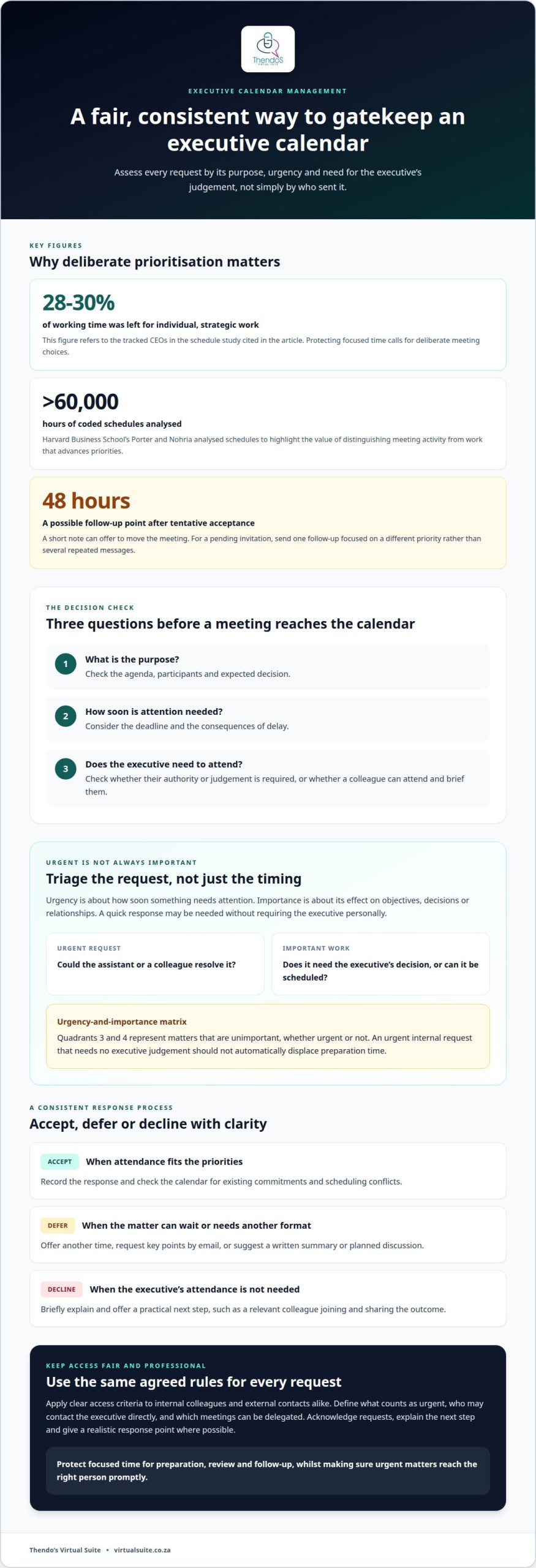
A response protocol sets out when the assistant accepts, declines, holds or follows up on an invitation. This gives the senior a consistent process without treating silence as agreement. The assistant checks the meeting’s purpose, project alignment and urgency, then records the response. For a tentative acceptance, a short note after 48 hours can offer to move the meeting. For a pending invitation, send one follow-up focused on a different priority, rather than several repeated messages.
How a professional EA offers alternatives when declining
A considerate decline briefly explains the decision and offers the requester a practical next step. This preserves a professional relationship without suggesting that the executive can attend every meeting. The assistant might offer another time, ask for key points by email, or suggest that a relevant team member attend and brief the executive afterwards. For example: “The executive can’t attend this discussion, but a colleague can join and share the outcome.”
How professionals use calendar tools to prioritise meetings
Use the executive’s calendar platform, invitation details and a clear response process to assess and track requests. These tools help the assistant review existing commitments, spot scheduling conflicts and record whether an invitation is accepted, tentative or declined. Before scheduling, check the agenda, participants and expected decision. A calendar view supports prioritisation, while a brief note about the request helps explain why the executive’s attendance may be needed.
How does a professional EA decide who gets access to the executive?
An executive assistant applies agreed access rules, then weighs each request against the executive’s priorities, urgency and role.
Protecting time for executive priorities
Access decisions reserve the executive’s attention for work that needs their authority or judgement. In South Africa, the same practical test applies: follow agreed access rules and assess the request’s purpose, urgency and relevance. The tracked CEOs in the schedule study had about 28-30% of their working time left for individual, strategic work, making deliberate prioritisation important.
Preserving preparation and review time
Protect blocks of calendar time for drafting, review and preparation instead of filling every gap with meetings. An executive assistant can keep these blocks visible and schedule suitable buffers around demanding discussions. For example, a partner preparing for a client meeting may need time beforehand to review documents and afterwards to record actions.
Reducing low-priority interruptions
Gatekeeping reduces avoidable interruptions by assessing requests against agreed criteria before they reach the executive. The assistant checks whether the executive needs to attend, present or make a decision, and whether a colleague can handle the discussion. This is especially useful for recurring internal updates: a written summary may provide what’s needed without adding another meeting.
Risks of calendar gatekeeping
Overly rigid screening can delay urgent information, exclude relevant colleagues or make access seem unfair. Clear rules reduce these risks: define what counts as urgent, who may contact the executive directly and which meetings can be delegated. A South African team, for example, can use the same criteria for internal requests across departments. For consistent screening, professional calendar support can maintain those agreed rules.
Distinguishing urgent matters from important matters
Urgency describes how soon a matter needs attention; importance reflects its effect on objectives, decisions or relationships. An urgent request may need a quick response without requiring the executive personally. For example, the assistant may handle a time-sensitive scheduling issue, while a strategic decision may be important but not require action today.
When managing an executive calendar, assess the deadline, the consequences of delay and the executive’s role. Ask what decision is needed, when it is required and whether someone else can resolve the matter. An immediate client concern may warrant prompt escalation. A general project update may be important, yet better suited to a written summary or planned discussion.
Harvard Business School’s Porter and Nohria analysed more than 60,000 hours of coded schedules. Their work highlights the value of distinguishing meeting activity from work that advances priorities. The urgency-and-importance matrix also identifies quadrants 3 and 4 as unimportant, whether urgent or not. An urgent internal request that needs no executive judgement should not automatically displace preparation time.
Good triage protects relationships as well as priorities. The assistant can communicate the executive’s availability and bring important matters forward promptly, rather than leaving requesters uncertain. Acknowledge receipt, explain the next step and give a realistic response point where possible. This approach helps urgent issues reach the right person without crowding out important work, supported by a clearer process for prioritising executive requests.
Thendo’s Virtual Suite: Calendar Management
Thendo’s Virtual Suite provides Calendar Management to organise executive commitments around agreed priorities. This support can help when invitations arrive from several teams, scheduling conflicts recur or important work struggles to retain space.
A calendar management professional can assess a meeting’s purpose, urgency and attendance needs, then coordinate responses and preserve time for preparation and follow-up. Virtual assistant support helps keep routine calendar administration consistent, while structured operational support can align scheduling practices with established workflows.
Clear guidance on priorities, access and fixed commitments helps shape calendar management around the executive’s working preferences. To discuss support for your executive calendar, contact Thendo’s Virtual Suite.
Make calendar stewardship part of a stronger operating rhythm
Managing an executive’s calendar means more than protecting empty space from low-priority meetings. It involves making access decisions as part of a considered way of working, setting clear expectations for colleagues and following through reliably on commitments. Consider whether calendar coordination needs ongoing support or would work better alongside broader operational responsibilities.
Thendo’s Virtual Suite offers virtual assistant support and structured operational support, including CRM Management to support organised client administration. These services can complement Calendar Management when scheduling connects with wider business workflows.
If you’d like to discuss support that suits your executive’s working preferences, contact Thendo’s Virtual Suite. A more deliberate calendar routine can begin with a thoughtful conversation.
Frequently Asked Questions
Does gatekeeping apply to internal team members too?
Yes. Internal colleagues can use the same request route, with agreed exceptions for established responsibilities or confidential matters. For example, a project lead might send a brief through the executive assistant, while a direct report uses their regular one-to-one meeting. Clear routes help staff know where to raise issues without making access feel dependent on personal relationships.
What is executive assistant gatekeeping?
Calendar management includes practical administration around access, not just decisions about invitations. An executive assistant may maintain request details, update participants when arrangements change and keep sensitive information discreet in calendar entries. For example, a confidential personnel discussion could have a neutral title, with necessary context shared only with those involved.
How do professionals prioritise meeting requests for an executive calendar?
A useful request record captures the proposed agenda, attendees, any pre-reading and the outcome the organiser needs. These details help the assistant spot duplicate sessions and identify missing preparation before scheduling. For example, if document review is the only purpose, the organiser may be able to circulate the material and collect comments asynchronously.
What criteria make a meeting high priority for an executive?
Some commitments take priority because the executive has already accepted a formal role, such as chairing a board discussion or presenting a decision. A fixed external deadline can also affect scheduling. The assistant can note these obligations when coordinating the calendar, so a meeting is not treated as interchangeable with a routine discussion.
How do professionals politely decline or defer low-priority meeting requests?
Keep the reply concise, address the organiser by name and avoid criticising the proposed meeting. If the request may matter later, record the topic and reason for deferral so it can be revisited during an appropriate planning period. This gives the organiser a clear outcome without creating an open-ended expectation of a meeting.

Article by
Thendo Sadiki
CEO of Virtual Suite