

Managing meeting scheduling conflicts seamlessly starts with recognising that a conflict occurs when someone is expected to attend two or more activities at the same time. Overlapping meetings, limited visibility of availability and competing priorities can all contribute.
When calendars are full, clashes can feel unavoidable. Clear availability, timely alerts and thoughtful scheduling make changes easier to manage and reduce the pressure of back-to-back commitments.
This article explains common causes of scheduling conflicts and how alerts and reminders can help teams respond. It also explores the value of breaks between meetings and unbooked calendar time, giving people room to transition, handle unexpected work and keep plans workable.
Key Takeaways
- Spot common causes of schedule clashes, including overlapping commitments and limited visibility of availability.
- Use calendar visibility and timely schedule updates to coordinate changes with less disruption.
- Automatic conflict alerts and reminders can help teams notice clashes and prepare for upcoming meetings.
- Protect time between meetings and leave calendar space for transitions, focused work and unexpected tasks.
1. What Are Schedule Conflicts and What Are Their Causes?
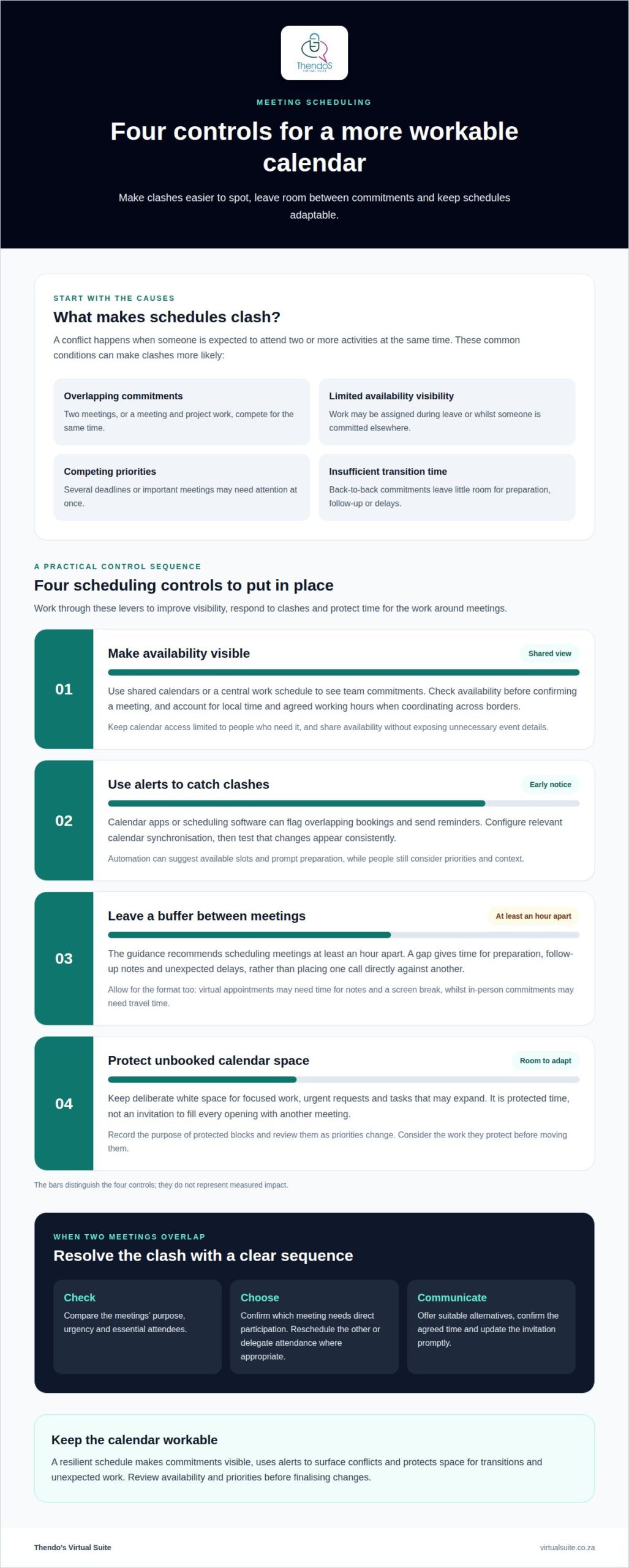
A schedule conflict happens when a team member has two or more activities at once. Two meetings booked for the same time create a direct clash. Project work assigned at 100% capacity can also overlap with non-billable tasks. Limited visibility may lead to work being assigned during leave, or while someone is committed to another project.
A professional assesses availability alongside each person’s role, skills, working arrangements and task duration. Before assigning a client presentation, for example, they check who has the relevant expertise and time to prepare. Logged time data can help estimate how long similar tasks have taken. Reviewing these details before a project starts can reveal capacity gaps and competing deadlines.
Shared calendars and a central work schedule give a professional a clearer view of team commitments. They check invitees’ calendars where available, account for time-zone differences and confirm availability before finalising a meeting. If a clash occurs, they identify the reason, discuss priorities with relevant team members and communicate changes in advance. A daily update or email can keep everyone informed.
To propose alternative meeting times, a professional checks participants’ availability and offers options that avoid existing commitments. They confirm the chosen time with attendees before updating the invitation. For privacy, they limit calendar access to those who need it and share availability without exposing unnecessary event details. Reviewing access permissions when responsibilities change helps keep sensitive appointments visible only to authorised colleagues.
2. Automatic conflict alerts and meeting reminders
A professional uses calendar apps or scheduling software to display availability, flag overlapping bookings and send reminders. These prompts help employees spot clashes early, protect productivity and respond before timelines are affected.
Setup starts by identifying the calendars used by the team and deciding which commitments should be visible. The professional configures synchronisation between relevant calendars, tests whether changes appear consistently and sets alerts for new invitations or conflicting events. Clear permissions help people see the availability information they need.
Automated scheduling can suggest available slots, while reminders prompt attendees to prepare or report a change. When a meeting needs rescheduling, the professional checks participants’ calendars, proposes suitable alternatives and updates the invitation once everyone agrees. Automation supports the workflow, while the professional considers priorities and context.
The most useful tools display team availability, flag clashes and send reminders within the calendars people already use. A professional selects and configures them around existing workflows, required integrations and access needs.
To prioritise overlapping meetings, the professional considers each meeting’s purpose, urgency and essential attendees. They may reschedule a lower-priority meeting or delegate one that does not require the organiser’s direct involvement.
If two important meetings overlap, the professional confirms which requires direct participation, then offers alternatives for the other. They communicate the change promptly and share relevant notes or delegate attendance where appropriate.
In South Africa, scheduling tool costs depend on the required features, number of users, integrations and support. A professional weighs these needs against the organisation’s existing calendar setup before recommending an option.
For cross-border teams, the professional checks each attendee’s local time and agreed working hours before sending an invitation. A consistent calendar management workflow helps keep those details organised.
3. Breaks between meetings and calendar white space
A professional plans gaps around meetings so conversations can finish properly and the next commitment can begin on time. The guidance recommends scheduling meetings at least an hour apart. This leaves room for preparation, follow-up notes and unexpected delays instead of placing one call directly against another. Managing meeting scheduling conflicts seamlessly also means treating these gaps as part of the schedule, not as unused time to fill.
After a client review, for example, the organiser can reserve a gap to capture decisions and assign actions before the next discussion. The professional considers the meeting format and transition needs. A virtual appointment may need time for notes and a screen break, whilst an in-person commitment may require travel time. These buffers reduce the risk of an overrun causing later calendar entries to overlap.
Calendar white space is deliberately unbooked time, not an invitation to fill every opening. A professional protects blocks for focused work, urgent requests and tasks that tend to expand. In project management, slack time added to a milestone or due date can absorb delays and give the team room to address schedule changes. The amount of space depends on workload, task duration and changing priorities.
Calendar software can show protected blocks alongside meetings, helping colleagues see when someone is available. The professional records each block’s purpose, reviews it as priorities change and avoids moving it without considering the work it protects. Plan for both commitments and recovery space, while keeping some capacity open for unexpected work. This makes the schedule more resilient without treating every free slot as spare meeting time.
Thendo’s Virtual Suite
Thendo’s Virtual Suite provides practical support when meeting clashes, changing priorities and unclear availability make team schedules difficult to coordinate. Its virtual assistant and structured operational support can help organise calendars and keep schedule changes visible to the people affected.
For teams managing overlapping projects, Project Coordination can bring deadlines and commitments into clearer alignment. Executive & Administrative Support includes scheduling and calendar management to help maintain an organised view of meetings and protected work time. This support is useful when rescheduling has become a recurring task or leaders need more time for core responsibilities.
The right approach depends on how your team works, which calendars it uses and how changes are communicated. Contact Thendo’s Virtual Suite to discuss support for your scheduling and operational needs.
Make the calendar support the work
A well-managed calendar should serve the work, not become another source of pressure. Treating availability as part of how the team operates helps protect attention, make room for changing priorities and keep commitments aligned. A considered approach to managing meeting scheduling conflicts seamlessly can also reveal when scheduling habits need to change.
If coordinating calendars is taking time away from leadership or essential work, practical operational support can bring greater consistency to the process. Discuss the scheduling demands your team faces and the support that would fit in a free consultation with Thendo’s Virtual Suite.
Contact Thendo’s Virtual Suite to discuss your needs. With a clearer approach, your team can move forward with greater focus.
Frequently Asked Questions
What Are Schedule Conflicts and What Are Their Causes?
Schedule conflicts are coordination problems that prevent a person, resource or decision-maker from being available when needed. To assess one, a coordinator can record the affected commitment, its owner, the consequence of changing it and any dependencies. Moving a review, for example, may also affect a subsequent approval, so identifying that dependency helps determine a workable response.
What Are the Benefits of Good Meeting Planning?
Good meeting planning helps attendees arrive prepared to contribute to a defined outcome. An organiser can state the decision required, identify who owns it and circulate relevant documents beforehand. A project review, for example, can distinguish items needing approval from updates shared for awareness. This structure clarifies each participant’s role and leaves a clear record of agreed actions.
What are scheduling issues and how do they happen?
Scheduling issues include practical gaps in the arrangements, such as an invitation with no clear purpose, a missing meeting link or uncertainty about who must attend. They can arise during handovers between organisers or when details change but the invitation is not updated. A consistent invitation format that includes the purpose, attendees and joining details helps prevent these avoidable snags.
When Do Meeting Conflicts Occur?
Conflicts often become visible at decision points, such as a project approval that depends on several stakeholders or a deadline review requiring input from different teams. A coordinator can map these dependencies before confirming the meeting, then identify which participants are essential for each decision. This distinguishes meetings that need everyone present from those that can proceed with delegated input.
What causes meeting scheduling conflicts and how can teams prevent them?
Unclear meeting requests can create avoidable clashes because organisers may not know the purpose, urgency or essential attendees. Teams can use a simple request process that captures the desired outcome, decision-maker and preferred timeframe before a booking is made. If priorities remain unresolved, a manager can facilitate a discussion so affected colleagues agree which commitment takes precedence.

Article by
Thendo Sadiki
CEO of Virtual Suite