

What if the most useful inbox system isn’t another filter, but a clear decision about what should reach you? An email triage system for executives works best when routine messages are organised, priorities are surfaced and decisions that need your judgement remain with you. Delegation can create that structure, provided you set clear boundaries and agree reliable handovers.
If your inbox is competing with leadership work, the answer isn’t simply to automate more. This guide explains how to delegate email to an assistant, where rules-based filtering helps and where human judgement matters. You’ll also learn what to look for in executive email triage support, including discretion, sound judgement and a process built around your priorities. The aim is a calmer, more manageable inbox, with your attention reserved for messages that genuinely need it.
Key Takeaways
- Delegate routine inbox work with clear priorities, approval boundaries and a consistent handover process.
- Use email rules to organise predictable messages, while keeping sensitive or judgement-heavy decisions under human review.
- Assess an assistant’s discretion, communication judgement and ability to follow your working preferences before entrusting inbox tasks.
- Structured systems and virtual assistant support can help bring inbox work into a more manageable operational workflow.
What Are Email Triage Tools?
- Assess tools against the executive’s accounts and working patterns. Microsoft Outlook and Google Workspace support different inbox arrangements, so an assistant can map the required accounts, integrations and routing before recommending a setup. Mailbird offers a unified inbox approach for multiple accounts; assess whether its integrations suit the services already used and the way incoming messages need to be handled.
- For South African inboxes containing personal information, consider the relevant POPIA obligations for the way that information is handled. Practical safeguards include granting access only to necessary folders, using individual permissions and agreeing how potential security incidents are raised. These are sensible operational measures, not a claim that POPIA prescribes these exact steps.
- Organise messages around the decisions they require. An assistant can help organise messages into categories such as client requests, internal updates and items awaiting review. For example, meeting invitations can be grouped for scheduling, while an invoice query can go to the appropriate finance folder instead of sitting amongst general correspondence.
- Reduce clutter through a considered unsubscribe routine. The assistant can identify recurring newsletters, promotions and automated notices, then prepare a review list before unsubscribing. This lets the executive retain useful reading whilst reducing unwanted email volume. A 30-minute review can help identify exceptions and refine the routine.
- Clarify responsibilities across executive and shared inboxes. An assistant can track routine requests and outstanding follow-ups, while you retain ownership of sensitive conversations. For example, assign a shared enquiry to a named team member to prevent duplicate replies and make the next action clear.
Limitations of rules-based email automation
An assistant can prioritise urgent messages using an approved VIP sender list alongside the subject, deadline and account context. A message from a key client may need prompt attention, whilst a routine update from the same sender may not.
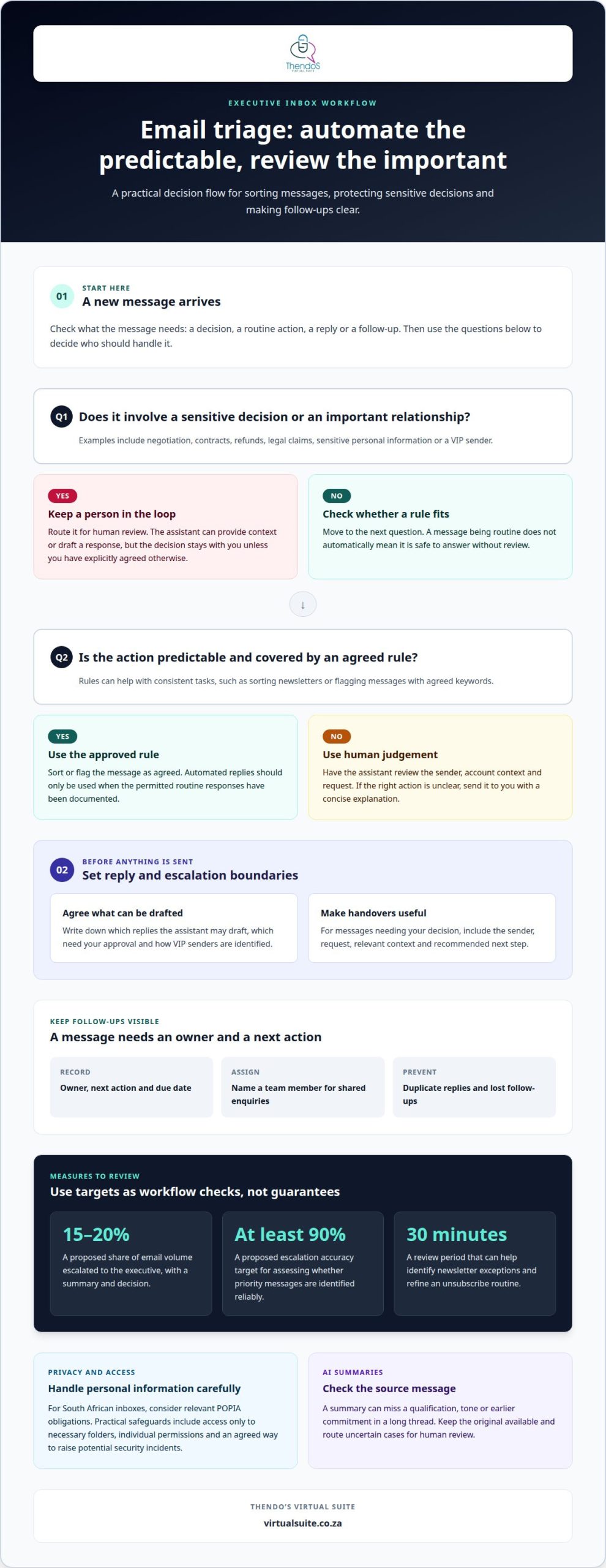
- Use rules for predictable actions, such as sorting newsletters or flagging messages with agreed keywords. A filter can move a message automatically, but it can’t reliably interpret a changed deadline, an unusual request or an important relationship without context.
- Set clear approval boundaries before enabling any automated response. Replies involving negotiation, contracts, refunds, legal claims, sensitive personal information or VIPs should go to a person for review. Document which routine responses, if any, may be sent automatically.
- Use escalation targets as workflow measures, not guarantees. One proposed approach sends 15-20% of email volume to the executive, with a summary and decision. An escalation accuracy target of at least 90% can help assess whether the rules identify priority messages reliably.
- Pair filtering with collaboration and scheduling tools. A shared task list can record the owner, next action and due date for messages that need follow-up. This stops an email disappearing into a folder without anyone taking responsibility.
- Review AI summaries against the original message before acting. A summary can miss a qualification, tone or earlier commitment in a long thread. Use a structured email workflow that keeps source messages available and routes uncertain cases for human review.
Choosing an assistant for email triage
An email triage system organises incoming messages, while inbox zero aims to clear the inbox. An assistant adds human judgement, especially when an urgent request needs context.
-
Compare email triage systems with inbox zero
Decide whether your priority is an empty inbox or dependable handling of incoming requests. Inbox zero can encourage frequent reading and moving messages, but it doesn’t assign responsibility for follow-up. A structured triage workflow sorts messages by urgency, owner and next action, keeping a meeting request or client decision visible without requiring every message to be cleared.
-
Compare email triage systems with traditional executive assistants
Decide which work needs a person and which can follow rules. Filters can route predictable notices, while an assistant can interpret a sender’s context, draft responses and flag sensitive requests. Executive & Administrative Support can also cover scheduling and day-to-day business administration. Choose support based on the work you need handled, rather than assuming automation can replace judgement.
- Test an assistant’s judgement with realistic examples before granting broad access. Ask them to classify a routine update, an urgent client concern and an ambiguous request. Review their reasoning, proposed action and escalation path for each. A clear explanation of why a message needs your attention is more useful than a label alone.
- Agree boundaries and communication preferences in writing. Document which responses the assistant may draft, which messages need approval and how VIP senders are identified. Include a handover format with the sender, request, relevant context and recommended next step, so you can make decisions without rereading the entire thread.
Thendo’s Virtual Suite: Systems and Process
Thendo’s Virtual Suite provides virtual assistant support and structured operational support to help organise executive email triage. This is useful when incoming messages, follow-ups and decisions are spread across an inbox without clear ownership or consistent handling.
Structured operational support can establish how messages are sorted, which requests need your attention and how follow-ups are recorded. CRM Management can help keep relevant client communications and next steps organised alongside inbox activity. Clear priorities and agreed approval boundaries help an assistant support your workflow while leaving sensitive decisions with you.
If you’d like support organising email triage around your working priorities, book a consultation with Thendo’s Virtual Suite to discuss your needs.
Make your inbox work around your priorities
Treat email triage as part of how you lead, not simply as a way to clear messages. An email triage system for executives should reflect your decision-making style, the relationships that matter and the work that deserves your attention. That alignment gives an assistant a clear framework for acting consistently while preserving your professional voice.
Start with a conversation about what currently interrupts your focus and which inbox decisions you want to retain. From there, shape boundaries and handovers around your actual responsibilities, rather than relying on a generic set of rules.
If you’re ready to explore a more considered approach to your inbox, contact Thendo’s Virtual Suite to discuss a practical next step.
Frequently Asked Questions
How can an executive delegate email triage to an executive assistant?
Make the transition traceable by agreeing how completed and pending work will be recorded. For example, an assistant can maintain a decision log for recurring matters, noting outcomes and preferences that should guide similar requests in future. Review the log together periodically so established decisions remain consistent and new exceptions receive attention.
The Volume Crisis: How Much Email Is Too Much?
Email volume is too high when its consequences start affecting important work. Look for a sustained backlog, client commitments that are difficult to track, or correspondence that regularly pushes planned priorities aside. The right threshold depends on your responsibilities and your organisation’s service expectations, not a universal message count.
What is an executive email triage system and how does it work?
An email triage system is an agreed operating framework for managing executive correspondence, supported by people, processes and suitable tools. Its effectiveness depends on clear ownership, reliable records and a way to learn from exceptions. For instance, record recurring requests that require judgement as patterns, helping the process adapt without treating every unusual message as routine.
What email triage workflows are best for executives?
The best workflow fits your working rhythm and your team’s handover points. A leadership team might benefit from a brief morning briefing on decisions affecting that day’s commitments, followed by an end-of-day note on unresolved matters. This connects correspondence with current priorities without making inbox activity the measure of progress.
How can a professional assistant set up email rules, labels and priority folders for an executive?
Keep the structure easy to maintain by using labels for stable business functions and avoiding overlapping categories. An assistant can document each label’s purpose and record exceptions that cause confusion. As responsibilities change, review obsolete labels and rules so the filing structure remains useful instead of accumulating categories no one recognises.

Article by
Thendo Sadiki
CEO of Virtual Suite