

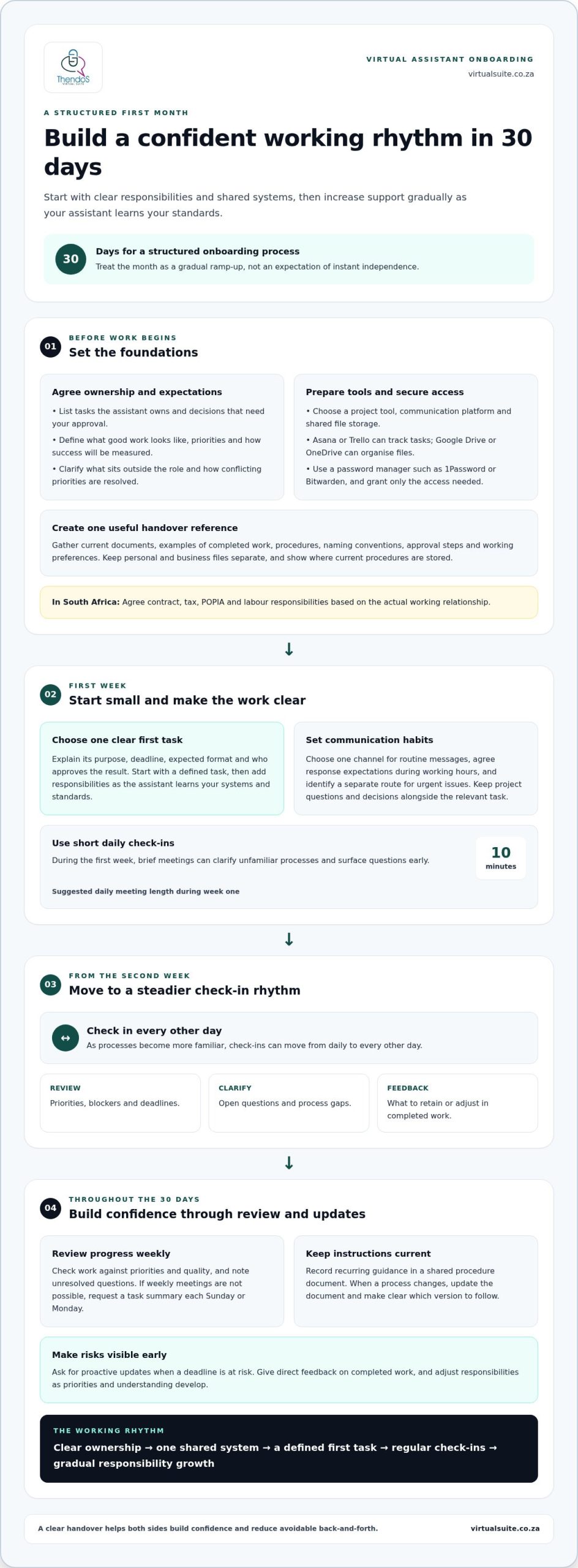
A well-structured virtual assistant onboarding process should take 30 days. That gives you time to clarify responsibilities, establish communication routines and review early work, rather than expecting a new assistant to understand your preferences immediately. The exact pace depends on the tasks, systems and level of guidance involved.
It’s reasonable to want virtual assistant onboarding to make support useful quickly, especially when your workload is already full. A clear start helps both sides build confidence and reduces avoidable back-and-forth. Begin by agreeing what matters most, how you’ll communicate and what successful early support looks like. This guide explains how to plan the first month, set practical responsibilities and agree on updates, feedback and priorities. You’ll also see what a structured onboarding approach can involve, from the initial conversation through to reviewing completed work, so the working relationship can develop steadily with shared understanding.
Key Takeaways
- Choose shared tools for tasks, communication and files, then agree how each will be used.
- Set clear ownership, priorities and measures of success so responsibilities are understood from the outset.
- Record working preferences and essential context in one practical reference for day-to-day support.
- Use a structured onboarding approach to keep tasks, feedback and priorities aligned as the working relationship develops.
How long does it take to onboard a virtual assistant?
Allow 30 days for a structured onboarding process. In South Africa, agree contract, tax, POPIA and labour responsibilities based on the actual working relationship.
-
Set Communication Channels and Response Expectations
Choose one channel for routine messages, such as a collaborative communication tool, and define when to use it. Set expected response times during agreed working hours, plus a separate route for urgent issues. For example, keep project questions in one channel and record decisions beside the relevant task. Avoid splitting instructions across email, chat and personal messaging, where priorities can become difficult to follow.
-
Arrange Check-ins and Feedback
Schedule weekly check-ins to review priorities, blockers, deadlines and feedback. During the first week, short daily meetings of 10 minutes can clarify unfamiliar processes. From the second week, check-ins can move to every other day. After the first task, review the result together and explain what to retain or adjust. If weekly meetings aren’t possible, request a task summary each Sunday or Monday.
- Select a project management tool, communication platform and shared storage location before work begins. Asana or Trello can hold task owners, deadlines and progress; Google Drive or OneDrive can organise working files. Use one agreed password manager, such as 1Password or Bitwarden, rather than sending credentials through chat. Grant access only to the tools and files needed for assigned work, then show where current procedures are stored.
- Use the 30-day period as a gradual ramp-up, not an expectation of instant independence. Start with a small, clearly defined task, then add responsibilities as the assistant learns your standards and systems. Record recurring instructions in a shared procedure document. Ask for proactive updates when a deadline is at risk, and give direct feedback on completed work. Review progress weekly against priorities, quality and unresolved questions.
Defining roles, responsibilities, and expectations
Write down who owns each task, what good work looks like and how decisions are made. A clear agreement gives the working relationship practical boundaries from the outset.
-
Define Roles and Responsibilities
List the tasks the assistant owns, the decisions they can make, and anything requiring your approval. For example, they might prepare a weekly CRM update, while you approve changes to customer records. Clarify what falls outside the role, too. During the first 90 days, revisit how responsibilities support your definition of success and adjust workloads when priorities change.
-
Collect Documents and Record Expectations
Create one shared reference for procedures, preferences and essential documents. Include examples of completed work, naming conventions, approval steps and the right contact for questions. Record how the assistant should handle sensitive information and where working files belong. Keep instructions current: when a process changes, update its document and tell the assistant which version to follow.
-
Set Success Measures and Client Expectations
Choose practical measures for each responsibility, such as accurate records, tasks completed by agreed deadlines or clear status notes. Define what counts as urgent and how soon routine messages should receive a response. Agree how feedback will be given and who resolves conflicting priorities. Review these measures together so performance reflects the agreed scope, not unspoken assumptions.
- Write the agreement in plain language and review it together before work begins. A simple table can show the task, owner, deadline, approval point and completion standard. Clear role expectations can reduce early-stage turnover by up to 50%. For a consistent handover, organise your systems and processes around the documented responsibilities.
What is an onboarding process?
Start by sharing business context and working preferences, then organise documents, write procedures and prepare access to the tools needed for each task. These steps give the assistant a practical reference for handling work consistently.
-
Organise Client Documents and Passwords
Create a clearly organised folder for current documents, templates and reference materials. Use descriptive file names, such as “invoice approval steps”, so the right version is easy to find. Store credentials in a password manager and share access securely, rather than putting passwords in a document or email. Keep personal and business files separate, and grant access only to resources needed for assigned tasks.
-
Document SOPs and Prepare Account Access
Write a standard operating procedure for each recurring task, using concise steps and an example of the expected result. For invoice handling, note where invoices arrive, how details are recorded and when approval is required. Prepare the relevant accounts before work starts, then confirm the assistant can access each approved tool. Avoid sharing broad administrator access when a limited role will support the task.
- Record preferences that shape daily work in a short reference document. Include preferred names, pronunciation, meeting preferences, calendar boundaries, writing style and approval habits. For example, specify whether draft emails need review before sending. Use an initial conversation to explain the context behind these preferences, then invite questions wherever written notes leave room for interpretation.
- Complete the handover with a task brief, relevant documents and a clear first assignment. Explain its purpose, deadline, expected format and who approves the result. Introduce the systems the assistant will use, such as a calendar, CRM or shared drive, and identify where each procedure lives. During the first week, note questions that reveal missing instructions, then update the reference materials before similar work recurs.
Managed virtual assistant onboarding
A managed approach gives onboarding a clear sequence, from preparation to review. Use a 45-minute kick-off to align priorities, responsibilities and working preferences.
- Before the call, gather business context, likely tasks and relevant questions. Use the time beforehand to review client notes and research the organisation. During the conversation, ask how success is defined, which tasks need attention first and what decisions require approval. This preparation keeps the meeting focused rather than relying on general introductions.
- Set a foundation with a concise welcome and orientation on the first day. A live welcome call can take 20 minutes. Introduce the people involved, explain how work moves through the business, and describe where task guidance lives. A short, orderly start helps the assistant connect responsibilities with the wider operation.
- Agree a regular rhythm for questions and progress updates during the first two weeks. Ask about business goals, preferred ways of working and upcoming priorities, then note the answers in your working reference. This is also the time to clarify unfamiliar terms and handover gaps. Encourage questions early, before an assumption affects a deadline or decision.
- Introduce the assistant to relevant colleagues and include them in meetings or email threads related to their responsibilities. For example, an assistant coordinating project actions needs context from the people responsible for each deliverable. Keep introductions purposeful: explain why each person is involved and what information the assistant should manage.
- Review the arrangement at the 30-day mark in a focused 30-minute conversation. Discuss completed work, recurring questions, changing priorities and any procedures that need refinement. Compare expectations with actual workflows, then agree the next responsibilities. A managed process is most useful when these regular reviews lead to practical adjustments, not simply a status report.
If a structured start would help your team, explore virtual assistant support.
Thendo’s Virtual Suite: Virtual assistant support
Thendo’s Virtual Suite provides virtual assistant and structured operational support when onboarding tasks and ongoing administration compete for your attention. Executive & Administrative Support, Business Tools & Systems Support and Project Coordination can help organise recurring work, maintain systems and keep tasks moving.
Consider support when you’ve identified tasks to delegate but need dependable help carrying them forward. Before work begins, outline the responsibilities, priorities and preferred communication approach you’ve established. This gives the working relationship a clear starting point and helps align support with your day-to-day operations.
Explore the support available and decide whether it fits your needs by visiting virtualsuite.co.za.
Build a working relationship that can grow
Treat delegation as an evolving working agreement, not a handover completed on day one. As new tasks emerge, note which decisions can be made independently and where your input still matters. This keeps support aligned with changing priorities and clarifies how responsibilities are developing.
Set a regular time to discuss what is working smoothly, what remains unclear and which responsibilities could be better defined. These conversations help address uncertainty before it becomes a source of friction. Keep agreed changes visible in the relevant process notes, so expectations stay current as work evolves.
Good virtual assistant onboarding creates a foundation for support that can adapt alongside your business. Book a consultation with Thendo’s Virtual Suite to discuss your needs and identify a practical next step.
Book a free consultation with Thendo’s Virtual Suite to discuss the support that would suit your work.
Frequently Asked Questions
How do I know if my VA onboarding is working?
Onboarding is working when the assistant can complete agreed tasks with fewer clarifications and explain how their work supports your priorities. Look for practical signs, such as accurate updates, sensible questions raised early and fewer repeated corrections. If the same misunderstanding keeps returning, improve the instruction or example rather than assuming the assistant already understands your preferred approach.
What should I include in a VA welcome document?
Include a concise introduction to your business, its main services, customer groups and working principles. Add a contact list showing who handles key decisions, plus a glossary for internal terms or abbreviations. A brief note about how your organisation presents itself to clients can also help the assistant write consistently. Keep the document easy to scan, and revise it when your structure or priorities change.
What’s the biggest mistake agencies make when onboarding a VA?
A common mistake is assigning a full workload before the assistant understands how the organisation works. That can leave little room to learn unfamiliar systems, terminology or approval habits. Start with work that has a clear outcome and manageable scope, then build complexity as the assistant gains context. Avoid treating early uncertainty as a lack of capability when the underlying issue may be missing guidance.
Why is onboarding important for new VA hires?
Onboarding gives a new assistant enough context to represent your business thoughtfully, rather than completing tasks without understanding their purpose. For example, someone responding to customer enquiries needs to know which matters require escalation and what tone suits your clients. A considered introduction also helps both parties identify gaps in the working arrangement before they affect service or create unnecessary rework.
What does virtual assistant onboarding involve?
Virtual assistant onboarding involves preparing an assistant to work within your business, from understanding its priorities to learning relevant systems and practices. It can include an initial discussion, task orientation, introductions to relevant colleagues and opportunities to clarify unfamiliar work. The process should connect daily assignments to your wider goals, so the assistant understands not only what to do, but why each responsibility matters.
What information and access should a business provide when onboarding a virtual assistant?
Share the business context needed for the role, including customer expectations, key contacts, decision boundaries and examples of successful work. Provide access only to the tools and information needed for assigned responsibilities. For instance, a calendar role may require scheduling access but not access to unrelated records. Review permissions as duties change, and remove access that is no longer required for the work.

Article by
Thendo Sadiki
CEO of Virtual Suite