

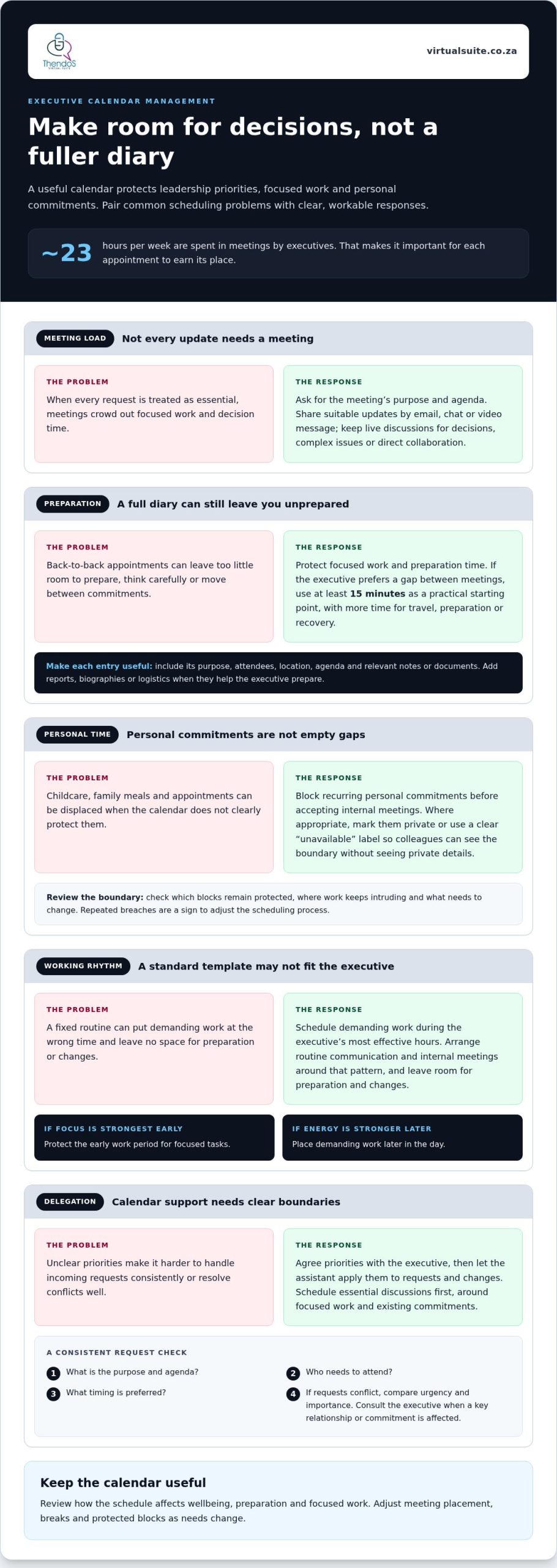
Executives spend about 23 hours per week in meetings, leaving little room for focused work when every request is treated as essential. Executive calendar management best practices start with aligning meetings and task blocks to the leader’s priorities, protecting personal commitments and adjusting the schedule when needs change. Effective management also means delegating scheduling decisions within clear boundaries, so the calendar stays useful rather than merely full.
A full diary can look organised while leaving little room for preparation, thoughtful decisions or time away from work. The answer isn’t to fill every gap, but to decide deliberately what deserves a place and what can be handled another way.
This guide covers executive-level calendar management, protecting personal and family time, and scheduling around an executive’s priorities. It also explains how to build a practical calendar template around routines, working patterns and key responsibilities.
Key Takeaways
- Give each meeting a clear purpose, and move suitable updates to asynchronous communication to make room for focused work.
- Use do-not-schedule blocks to safeguard personal commitments, then review whether the boundaries are holding in practice.
- Delegate calendar coordination with clear priorities so meeting requests and changes are managed consistently.
- Shape a reusable calendar template around your working rhythms, essential responsibilities and preferred preparation time.
1. What is executive-level calendar management?
Executive-level calendar management organises meetings, preparation and focused work around leadership priorities. Executives spend about 23 hours per week in meetings, so each appointment should earn its place. A workable set of executive calendar management best practices protects time for decisions, not simply more diary entries.
Ask for the purpose and agenda of each meeting. If an update can be shared by email, chat or video message, handle it asynchronously instead of adding another virtual meeting. Reserve live discussions for decisions, complex issues or work that benefits from direct collaboration.
Shared calendar software is effective when the executive and authorised colleagues can see availability, coordinate changes and avoid double bookings. Scheduling tools can help identify suitable time slots; a video platform supports remote discussions. Choose tools that fit existing workflows, then keep calendar access and naming conventions consistent.
For a South African workplace, set an internal policy stating normal working hours, meeting availability and how exceptions are handled. Separate personal and business commitments where useful, and make the boundaries clear to meeting organisers. Calendar rules should support the organisation’s agreed working arrangements.
There is no single buffer that suits every diary. A practical starting point is at least 15 minutes between meetings when the executive prefers that interval, with more time for travel, preparation or recovery. Schedule physical travel time and, where useful, a reminder to leave.
For hybrid teams across time zones, share agendas and expectations in advance, and include the meeting location or virtual joining details in the invitation. Where appropriate, rotate inconvenient meeting times so the same colleagues aren’t always asked to join outside their usual working day.
Each calendar entry should state its purpose, attendees, location, agenda and any relevant notes or documents. Add reports, biographies or logistics when they help the executive prepare in one place. This makes meetings easier to assess and attend effectively.
Review the schedule’s effect on wellbeing during a weekly one-to-one or written update. Ask how the pace feels, then adjust meeting placement or breaks accordingly. Mood and energy can indicate when the diary needs to be reorganised around strategic priorities.
2. Protecting personal and family time with do-not-schedule policies
A do-not-schedule policy makes personal commitments protected time, not empty gaps. Block recurring commitments such as childcare, a family meal or an appointment before accepting internal meetings. When appropriate, mark personal entries private on the work calendar, so colleagues can see you’re unavailable without seeing private details.
Keep business and personal calendars and email accounts separate where practical. If they need to work together, review availability across both before confirming a meeting. A clearly labelled block such as “unavailable” can prevent clashes while keeping personal information discreet. Protect focus time in the same way, especially when concentrated work supports a priority decision or deliverable.
Productivity depends on fit, not a standard template. Schedule demanding work during the executive’s most effective hours, and arrange routine communication or internal meetings around that pattern. If an early start supports focused work, protect it; if energy is stronger later, schedule accordingly. Leave room for preparation and changes rather than filling every opening.
Inclusive scheduling also means considering major religious observances before setting important meetings or deadlines. Check the team calendar while planning, then choose another date if an observance would make attendance difficult. For recurring meetings, review the pattern regularly so the same people aren’t repeatedly asked to choose between participating and observing.
Review the policy regularly with the executive and the person managing the calendar. Ask which blocks remain protected, where work keeps intruding and what needs to change. If dinner is repeatedly displaced by late internal meetings, build the boundary into the shared scheduling process and communicate it to organisers. Repeated breaches signal that the system needs adjusting, not another reminder.
For steadier scheduling routines, explore practical support for busy professionals.
3. Executive assistants as calendar managers and gatekeepers
Delegating calendar management gives an executive assistant responsibility for coordinating requests, changes and decisions within agreed boundaries. The executive remains involved in setting priorities, while the assistant applies those preferences consistently. For example, protect preparation time before a board meeting instead of filling every opening with another appointment.
Assess each meeting request against the executive’s goals, required attendees and the decision needed. Schedule essential discussions first, then place lower-priority requests around focused work and existing commitments. Map recurring meetings across the year, including board dates and the internal sessions needed to prepare reports and materials.
For a new request, the assistant can ask for its purpose, agenda, attendees and preferred timing before offering a slot. Accept meetings that support current priorities; decline or suggest another format when attendance isn’t necessary. If requests conflict, compare urgency and importance, then consult the executive when the decision affects a key relationship or commitment.
Calendar access should match each person’s role. Give the assistant enough visibility to coordinate availability, while limiting access to sensitive details where possible. Mark confidential meetings or personal appointments appropriately, and share only necessary information in invitations. Clear permissions and careful handling help protect privacy without hiding useful scheduling context.
Virtual administrative assistants can coordinate calendars remotely using shared scheduling tools and agreed processes. Set out who can accept invitations, move meetings or contact attendees, then keep a clear record of changes. A brief regular review helps the assistant understand shifting preferences and priorities. Where the executive prefers it, schedule at least 15 minutes of rest between meetings. This creates room to reset, prepare or manage an overrun before the next commitment.
4. Personalising a calendar management template
A template works best when it reflects the executive’s actual routines, not an idealised week. Start by mapping recurring commitments, preferred working hours and tasks that need uninterrupted attention. Include time for meals, reading, walking, networking, email catch-up and returning calls. These blocks make essential work visible before new appointments are added.
Next, schedule demanding work during the executive’s most productive periods. For example, reserve a morning block for strategy if that’s when concentration is strongest, then handle routine communication later. Consider how meeting-heavy days affect energy and decision-making. Discuss the pattern with the executive, then adjust the template to support priorities rather than preserve habits that no longer serve them.
Weekday themes can make organising more efficient, provided they suit the role. One possible pattern is focused work on Mondays, internal meetings on Tuesdays, external meetings on Wednesdays and Thursdays, and a flexible Friday. Treat this as a starting point, not a fixed rule. Adapt the themes around board commitments, client deadlines or other priorities.
Make the calendar easy to scan. Use consistent colour-coding, such as green for networking and a separate colour for personal appointments. Add a preferred reminder, such as 15 minutes before a meeting. Include relevant shared-drive documents or portal links in the entry, so preparation materials sit alongside the appointment details.
To build a tailored template, share calendar access and an organisational chart with the assistant, then complete a preferences form. Review the proposed week together before applying it. Check whether the blocks protect key priorities, whether travel or preparation time is missing, and how changes could affect colleagues. Revisit the template after a major shift in responsibilities.
If you’d like help shaping a calendar around your working patterns, book a free consultation with Thendo’s Virtual Suite.
Thendo’s Virtual Suite: Virtual assistant support
Thendo’s Virtual Suite provides virtual assistant support for leaders who need dependable help coordinating a busy calendar. When meeting requests, scheduling changes and preparation compete with strategic work, delegated calendar management can bring clearer structure to the day.
Support can include managing calendar commitments and organising operational tasks around agreed priorities. Structured operational support, Project Management and CRM Management can also help when scheduling is part of wider coordination across projects and business processes. The working approach can be shaped around the executive’s preferences, responsibilities and existing routines.
If you’re ready to give calendar coordination more consistent attention, visit Thendo’s Virtual Suite to explore the support available.
Put your priorities into practice
A calendar becomes more useful when its principles guide everyday decisions, not just planning sessions. Choose an upcoming week and notice where requests interrupt important work, personal commitments or preparation. Use those observations to refine the approach, then review what has changed before repeating the process.
Applying executive calendar management best practices is an ongoing discipline. Priorities shift, responsibilities evolve and a schedule that once worked may need adjusting. Keep the calendar responsive while maintaining clear boundaries around the time that matters most. Small, considered changes can make decision-making and daily coordination more intentional.
If you’d like support putting a more considered calendar approach in place, contact Thendo’s Virtual Suite. Start a conversation about the kind of structure that would help you focus on your next priorities.
Frequently Asked Questions
What is executive-level calendar management?
It’s the deliberate coordination of an executive’s time so the diary supports decisions, relationships and delivery. Treat the calendar as a working view of where leadership attention is needed, not simply a record of appointments. For example, a product launch may require time for approval, stakeholder discussion and review, not just the launch meeting itself.
How does calendar compartmentalisation work?
Calendar compartmentalisation groups similar activities into dedicated blocks, reducing the need to switch between unrelated tasks. An executive might reserve a block for reviewing reports, then handle routine correspondence separately. The distinction is between types of work, not simply meetings and free time. Leave a transition between blocks when an activity requires a different setting or preparation.
What are the best practices for managing an executive calendar?
Use a consistent process to review requests, update changes and check the upcoming schedule. A daily review, for example, can flag missing preparation, unresolved conflicts or meetings that no longer match current priorities. Agree who can make routine changes and which decisions need the executive’s input. This keeps calendar administration predictable without removing the leader’s oversight.
How can calendar time be protected for focused work and strategic priorities?
Give focus blocks a clear outcome, such as drafting a decision paper or reviewing a business plan, and treat them as commitments. Reduce avoidable interruptions by directing routine queries to an agreed channel and sharing when the executive is available. If urgent work arises, decide what to move or delegate instead of automatically sacrificing focused time.
How should travel time, preparation, and follow-up be included in an executive calendar?
Build the full appointment cycle into the schedule. For an off-site meeting, include the journey, time to review relevant papers and a short period afterwards for notes or actions. Identify the destination and purpose of each preparation block, so it’s clear what needs attention. After the meeting, record agreed next steps and assign follow-up responsibility.
Which executive calendar management tools and software are most effective?
Useful tools include shared calendar software to coordinate availability and avoid double bookings, scheduling tools to find suitable time slots, and video platforms for remote discussions. Choose tools that fit existing workflows, with consistent access and naming conventions.

Article by
Thendo Sadiki
CEO of Virtual Suite