

Delegate recurring, rules-based and research-heavy work that doesn’t require your personal authority. Research, CRM updates, scheduling, follow-ups, routine reports and AI-assisted preparation are practical starting points. The key to how to delegate to a virtual assistant is to specify the desired result, the process and when the task should come back to you.
It’s understandable to hesitate before handing over work that affects your customers or operations. A clear brief and a manageable first task can help build trust while keeping important decisions in your hands. This article explains which tasks are suitable to delegate, how to set them up clearly, and how scheduling, follow-ups, reporting and AI can fit into an organised workflow.
Key Takeaways
- Prioritise repeatable, rules-based work and research that doesn’t depend on your personal authority.
- Record your preferences and document what a finished task should look like, so handovers are easier to follow.
- Use clear processes for research, CRM updates, follow-ups and reports to keep information organised and useful.
- Give AI-assisted work a defined role, with human judgement retained for context and quality control.
- Set calendar boundaries and scheduling preferences in advance to protect focused time and make meetings easier to manage.
1. What Tasks Can You Delegate?
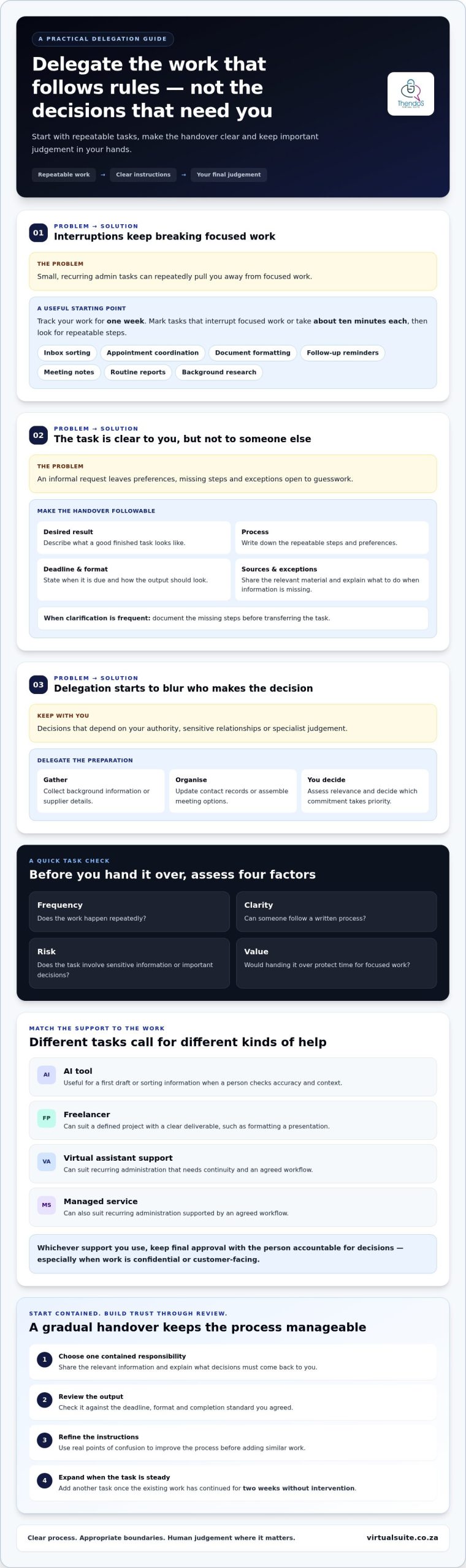
Start with work that repeats, follows clear rules or requires research rather than your personal judgement. Examples include organising meeting notes, updating contact records, preparing routine reports and gathering background information. Track your work for a week and mark tasks that interrupt focused work or take about ten minutes each. To work out how to delegate to a virtual assistant, identify the repeatable steps first, then explain what a good result looks like.
Choose administrative tasks by asking whether someone else could complete them with a written process and access to the necessary information. Inbox sorting, appointment coordination, document formatting and follow-up reminders are common candidates. Keep decisions that depend on your authority, sensitive relationships or specialist judgement with you. For example, an assistant can assemble meeting options while you decide which commitment takes priority.
Before handing over a task, assess its frequency, clarity, risk and value. A weekly report with a consistent template is easier to delegate than a one-off decision involving incomplete information. Note the deadline, preferred format, source documents and exceptions. If the task needs frequent clarification, document the missing steps before transferring it. Start with one contained responsibility, review the output and refine the instructions before adding similar work.
An AI tool, freelancer or managed service suits different needs. Use AI for a first draft or sorting information when a person will check accuracy and context. A freelancer may suit a defined project with a clear deliverable, such as formatting a presentation. Virtual assistant support or a managed service can suit recurring administration that needs continuity and an agreed workflow. Keep final approval with the person accountable for decisions, especially where information is confidential or customer-facing.
To choose and hire a virtual assistant in South Africa, define the recurring tasks, required skills, communication expectations and access needed, then assess fit against those criteria. A small, supervised task can show whether the person follows instructions and handles feedback well. You can find a reliable virtual assistant through professional referrals or a virtual assistant support service; review their relevant experience and working approach before agreeing on responsibilities.
Choose communication channels before work begins: use email for detailed briefs, phone for discussion and text for concise updates. For passwords and confidential information, provide access only to the accounts needed for training and supervised work, use multifactor authentication and avoid sending shared passwords in ordinary messages. Limit personal information to what the task requires, and remove access when responsibilities change. These steps set clear working boundaries without exposing unrelated business records.
2. What can you delegate to a virtual assistant?
Start with interruptions that repeatedly pull you away from focused work. If you’re often arranging travel, locating documents or confirming appointments, note the steps involved. Record your preferred suppliers, approval limits, file names and what to do when information is missing. These preferences turn an informal request into instructions someone else can follow consistently.
Choose a small, contained task for the first handover, such as compiling meeting papers or organising a travel itinerary from details you provide. Explain the intended result, share relevant documents and describe any decisions that must come back to you. A simple checklist can set out the order of work, the expected format and how to flag an exception without guessing.
Onboarding works best as a sequence. In the first week, demonstrate the task, provide a written example and let the assistant complete a supervised version. Invite questions early, then refine the instructions based on real points of confusion. Keep training materials in one shared location, so updates replace older guidance rather than leaving several versions in circulation.
Once the first task is running smoothly, add another when the existing work has continued for two weeks without intervention. This gradual handover gives you time to assess accuracy and gives the assistant room to learn your preferences. For example, move from preparing travel options to handling routine itinerary changes, while reserving unusual or high-impact decisions for your approval.
Set expectations by defining the deadline, format, priority and completion standard for each responsibility. A report might need the latest figures, a brief summary and a note about missing information. Review early work against those criteria, then give feedback with a clear example of what to change. A 30-minute weekly one-to-one can address questions, recognise what is working and update processes.
To set legal and tax expectations in South Africa, record the scope of work, payment terms, confidentiality arrangements and responsibility for invoices and tax records. Clarify the working relationship and its practical arrangements before work begins, then keep relevant records together for consistent administration.
For a structured handover across recurring tasks, virtual assistant support can help bring responsibilities and workflows into clearer order.
3. Research, CRM updates, follow-ups and reports
Research can be delegated when the question, sources and required output are clear. For example, ask for a comparison of suppliers based on published service details, delivery terms and contact information. Specify whether you need a short written summary, a table or source notes. The assistant can gather and organise findings while you assess their relevance and make the final decision. This keeps research useful without handing over judgement that belongs with you.
CRM updates work well when fields and rules are consistent. Provide a written guide showing how to record a new lead, log a conversation and mark the next action. For example, after a meeting, an assistant can enter the date, discussion summary and agreed follow-up. Ask them to flag missing or conflicting information rather than make assumptions. Regular updates give the team a clearer record of customer interactions.
Follow-ups can be prepared from approved templates and sent according to agreed instructions. A virtual assistant might draft a polite reminder after a proposal, then flag replies that need your personal response. A local account executive should not spend 50% of their time sending follow-ups and cold emails. Delegating the preparation and tracking of routine messages can preserve time for conversations requiring the executive’s expertise.
Reports are easier to review when the format stays consistent. Set out the reporting period, data sources, headings and any figures that need explanation. A weekly activity report, for instance, might summarise enquiries received, actions completed and items awaiting a decision. Ask the assistant to identify gaps and label estimates clearly. You can then review exceptions and trends without rebuilding the report from scattered updates.
Project coordination can also be broken into practical steps. An assistant can maintain a task tracker, record owners and deadlines, and request progress updates from colleagues. For a product launch, they might update the status of draft copy, design approval and supplier information. Keep decisions about scope, priorities or changes with the project lead. A written escalation rule helps the assistant distinguish routine delays from issues needing immediate attention.
Start with one workflow and review its hand-offs from beginning to end. Compare the CRM record with meeting notes, check that follow-ups use approved wording, and confirm that reports cover the correct period. Use any errors to refine the written process, then extend delegation to a related workflow. This steady approach helps a busy team maintain research, reporting and project updates.
4. Using AI and automation in delegated tasks
AI and automation can support a workflow, but each needs a defined role. A useful delegation framework recommends providing context and a briefing for the first 10% of the work, letting an assistant or AI complete 80%, and reserving the final 10% for quality control and judgement. For example, provide an approved report template, have a tool organise supplied figures, then review calculations and wording before sharing.
Identify suitable tasks by looking for predictable inputs and repeatable outputs. Sorting receipts into agreed categories, extracting dates from meeting notes and preparing a first draft from supplied material all have clear steps. A workflow is a stronger candidate when its instructions explain what to do with missing information. If each case needs a different interpretation, keep a person involved before taking action.
Automation can pass information between familiar stages, such as moving a form response into a task tracker. Before using it, map the sequence: what starts the process, which details move and where an exception goes. Test it with sample records first. For instance, check that a receipt’s date, supplier and total appear in the intended fields rather than assuming the transfer worked correctly.
A virtual assistant can prepare AI-assisted work by supplying context, checking sources and flagging uncertain details. When assigning the task, make the expected human review explicit, not optional. If AI drafts a customer email, the assistant can compare names, dates and commitments against the original record. You retain approval for messages that make promises or require judgement.
Keep decisions with the person who has the relevant authority. Pricing, staff matters, sensitive customer complaints and changes to business commitments can affect relationships or obligations. AI may organise the options and an assistant may gather background, but neither should make the final decision without clear delegated authority. For example, ask for a summary of supplier proposals, then choose the supplier yourself.
Define a quality check for each automated workflow. Compare a sample of processed receipts with the originals, confirm that report totals match their source records, and review drafts before they reach customers. Record recurring errors in the instructions, then retest the revised process. This creates a practical boundary: tools handle structured preparation, an assistant manages the workflow, and you retain final judgement where context matters.
5. Calendar and meeting scheduling
A virtual assistant can manage calendar requests by applying your priorities consistently. Write down working hours, preferred meeting lengths, travel time and any protected focus periods. For example, you might reserve mornings for concentrated work and group internal discussions later. A clear standard prevents every invitation becoming a separate decision, while leaving exceptions for your review.
Set availability boundaries before sharing calendar access. One scheduling rule is to take no calls before 10am. Record this alongside days you avoid meetings, preferred notice for appointments and time needed between commitments. If a client requests an exception, the assistant can check your stated priorities and bring the request to you rather than accepting automatically.
For each meeting, give the assistant its purpose, attendees and desired outcome. A project review may need the project lead, current status and a decision on next steps. Ask for a concise agenda, relevant documents and a suitable location or online meeting details. This helps attendees prepare and makes it easier to decide whether a proposed meeting needs your time.
Agree how calendar conflicts should be handled. The assistant can identify overlapping invitations, compare them with your priority rules and suggest alternative times. If a customer meeting clashes with an internal update, they might propose moving the internal discussion, then ask for your approval if the priority is unclear. This keeps routine adjustments moving without handing over decisions that need your judgement.
Use a consistent process for changes and cancellations. When someone reschedules, update the calendar, notify attendees and replace outdated meeting documents. For a cancelled appointment, record any follow-up action so the conversation doesn’t disappear from view. Agree which channel to use for urgent changes, and use written updates for routine adjustments that need a clear record.
Review the calendar together during a regular planning session. Check that preparation time, travel and follow-up actions sit alongside meetings, rather than being left to memory. Note recurring conflicts and refine the scheduling rules, such as how to handle requests from key customers. If managing these details is taking attention from your core work, get support with calendar and meeting scheduling through virtual assistant support.
Make the handoff part of a routine already in your calendar, such as setting aside time during a regular weekly planning meeting. The author recommends attaching delegation to an existing habit in this way, so calendar review can include checking what has been assigned, what remains unresolved and what needs your decision. Keep the review focused on priorities and clear next actions, rather than reopening every routine choice. A defined assignment can also help establish what the assistant may handle independently: for example, an assistant can schedule 3 social media posts per week using supplied templates and hashtags. Apply the same clarity to calendar work by stating the intended outcome, boundaries and when to return an exception to you. During the planning meeting, confirm that delegated work still fits your priorities and make any needed adjustment. This makes delegation part of an established routine and gives both of you a predictable point to raise questions.
Thendo’s Virtual Suite: Virtual assistant support
Thendo’s Virtual Suite provides virtual assistant support and structured operational support for founders, professionals and growing businesses. If recurring administration, follow-ups or scheduling are taking your attention from higher-priority work, this support can bring those responsibilities into a clearer working rhythm.
This can be a natural next step when you’ve identified suitable tasks but need dependable help carrying them through consistently. Clear priorities and processes give delegated work a practical foundation, while structured operational support helps keep recurring responsibilities organised.
To discuss virtual assistant support for your work, visit virtualsuite.co.za.
Make delegation part of how you work
Your next step doesn’t need to be a broad handover. Choose one responsibility that regularly competes with leadership work, then decide what you want to retain: approval, relationship management or final judgement. This sets a useful boundary for delegation and makes it easier to adjust the arrangement as your priorities shift.
A practical way to approach how to delegate to a virtual assistant is to treat it as an evolving working relationship, not a one-off task transfer. As your needs change, revisit which responsibilities require your attention and which can be handled through structured processes. Clear ownership helps prevent routine work from drifting back to you by default.
Thendo’s Virtual Suite offers virtual assistant support and structured operational support for founders, professionals and growing businesses. If you’re ready to explore support that fits your working priorities, contact Thendo’s Virtual Suite. A considered first conversation can help you identify a sensible place to begin, at a pace that feels right for your business.
Frequently Asked Questions
What can you delegate to a virtual assistant?
You can delegate clearly scoped support work, including preparing presentation slides from supplied content, transcribing recordings, proofreading documents and organising receipts. For example, share the approved source material and slide template, then ask for a draft presentation to review. Make the brief specific about the intended audience and format. Tasks involving private judgement or decisions on behalf of the business need an explicitly agreed approval boundary.
What tasks can you delegate?
Delegate tasks with a defined input and an output someone else can produce, such as formatting a manuscript to journal guidelines or arranging travel based on your stated preferences. A useful test is whether you can describe the task without relying on unstated knowledge. If you can explain what information to use, what to deliver and what to do with an exception, the responsibility is easier to hand over and assess.
How do I know when to delegate more?
Consider adding responsibilities when the current work is completed reliably and no longer needs frequent clarification. Look for evidence in the workflow: accurate records, appropriate escalation of unusual cases and fewer corrections to finished work. If routine requests still come back to you because instructions leave gaps, improve the process first. Add a related task only when its purpose and approval limits are clear.
Is delegating worth it for your business?
Delegating can be worthwhile when the time it frees up is more valuable for work that depends on your expertise, relationships or decision-making. Compare the effort needed to brief and review a task with the disruption it currently causes. For example, moving routine document formatting off your workload may make more sense than delegating a sensitive client decision that still requires your direct involvement.
How do you write clear instructions and standard operating procedures for a virtual assistant?
Write instructions around one completed example. State the task’s purpose, where source material is kept, the sequence to follow, the expected output and how to flag an exception. Add a sample finished document or anonymised record if it helps clarify the standard. Ask the assistant to follow the procedure once and identify unclear steps, then revise those parts before treating the document as the working standard.
What tools are best for assigning tasks and communicating with a virtual assistant?
Choose tools that make ownership and current status easy to see. A shared task board can show the task, responsible person, due date and progress, while a shared document space can hold current instructions and working files. Keep discussion in an agreed channel and record important decisions alongside the relevant task. The best arrangement is one your working relationship can use consistently.

Article by
Thendo Sadiki
CEO of Virtual Suite