

A virtual assistant is more than an extra pair of hands. Getting started with a virtual assistant works best when you know which tasks need support and what a dependable working arrangement looks like. That clarity helps you delegate with purpose, rather than creating another layer to manage.
If you’re a founder or small business owner, deciding what to delegate, how support should fit into your operations and which skills matter can feel difficult. These are sensible questions, whether you’re considering support for the first time or improving how you already work with an assistant.
This guide explains what virtual assistants do, how working arrangements can differ and how clear communication, organisation and attention to detail help work run smoothly. You’ll also see how structured operational support can bring more order to day-to-day business tasks.
Key Takeaways
- Identify the administrative, client, or operational tasks that would benefit most from reliable remote support.
- Choose a work arrangement that fits the role, whether ongoing part-time support, full-time remote work, or project-based assistance.
- Set clear expectations and use organised communication to support accurate, dependable work.
- Consider structured virtual assistant support when CRM tasks, project coordination, or day-to-day operations need more consistency.
What is a Virtual Assistant?
- Define the role. A virtual assistant provides remote support through digital tools, helping business owners manage tasks without adding someone to their premises. Support can help free up time for work that needs the owner’s attention.
- Identify tasks that could be delegated. Common administrative tasks include managing email, scheduling appointments, handling customer enquiries, entering data and conducting research. Creative support might involve formatting content or scheduling social media posts. Operational tasks can include updating client records and coordinating project actions.
- Start with tasks that are taking time away from important work. List recurring activities that could be handled by someone else, such as calendar management or updating client records. Consider which tasks have clear steps and outcomes, and choose a manageable starting point.
- Clarify how the work will be scoped and billed before it begins. Tasks may be arranged as hourly support or as a defined project, depending on the agreement. Specify what is included, such as scheduling appointments or preparing a content calendar, and how you’ll handle any changes to the agreed scope.
- Prepare the information and access needed for the work. Share relevant instructions, records and digital tools, and agree how customer enquiries or other sensitive tasks should be handled. Clear guidance helps a virtual assistant carry out work consistently.
- Integrate support into your existing operations. Decide how tasks will be assigned, where updates should be recorded and how priorities or deadlines will be communicated. Connecting delegated work to your current workflows helps keep responsibilities clear.
- Review the arrangement as work progresses. Check whether delegated tasks are being completed as agreed and whether the support is helping address the original need. Use what you learn to clarify instructions or adjust the tasks included in the arrangement.
Choosing virtual assistant support and work arrangements
- Choose a support arrangement that suits your business needs and availability. A virtual assistant may provide full-time, part-time or contract-based support. You can engage a freelancer directly or arrange support through an agency. Clarify the working relationship in the agreement or assignment terms.
- Set expectations before work begins. Agree working hours, response times, priorities and how urgent requests will be handled. For example, decide when the assistant should work on client tasks and whether evenings are included. Allow enough time for each assignment so deadlines and availability remain clear.
- Prepare the tools and access needed for the agreed tasks. Google Workspace provides tools for email, documents and calendars. Choose task-tracking and file-sharing tools that suit your business processes, and explain how the assistant should use them.
- Put the work terms in writing. Record the agreed services, deliverables, deadlines, payment timing, invoicing method, revision limits and how either party can end the arrangement. Clear terms help both sides understand the scope and payment expectations.
- Address confidential information in the agreement. Specify which client records the assistant may access, how they’ll be stored, who may use them and how files should be returned or deleted. Use strong account security and keep business information within approved work channels.
- Review the arrangement against your workload and business costs. Track the agreed work, deadlines and any changes to the scope. Review whether the support meets your needs, then adjust the tasks or service mix as your business develops.
- Review the arrangement regularly through dependable delivery, clear updates and examples of completed work. As your business needs change, discuss any new responsibilities and confirm them in writing. Keep the agreed scope, availability and review process clear for both sides.
A freelancer usually works independently with clients, while an agency arranges the role through its service. In either arrangement, the contract or assignment terms should clarify the working relationship.
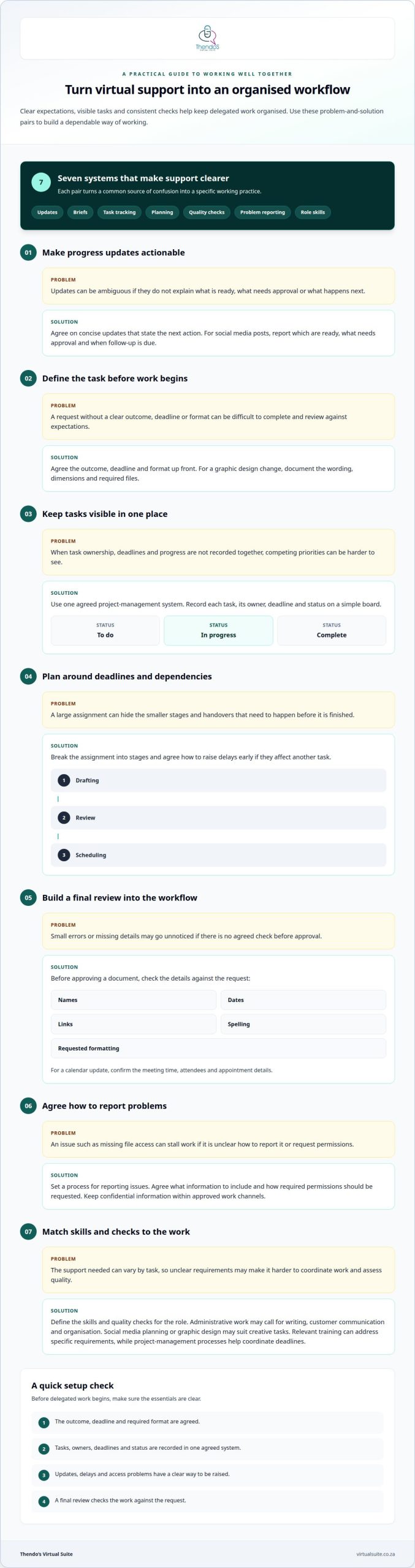
Essential communication and organisational systems
- Set expectations for concise updates that make the next action clear. For example, ask for updates on which social media posts are ready, what needs approval and when follow-up is due. Clear communication reduces ambiguity and helps you respond promptly.
- Agree on the outcome, deadline and format before work begins. For a graphic design change, document the wording, dimensions and files required so the work can be checked against your request.
- Organise work in one agreed project-management system. Record each task, its owner, deadline and current status. A simple board can separate tasks into “To do”, “In progress” and “Complete”, making competing priorities visible.
- Plan work around deadlines and dependencies. Break a large assignment, such as preparing a newsletter, into drafting, review and scheduling. Set a process for raising delays early if they affect another task.
- Build a final review into the workflow. Before approving a document, check names, dates, links, spelling and requested formatting. For a calendar update, confirm the meeting time, attendees and appointment details.
- Establish a process for handling problems. Agree how issues, such as missing file access, should be reported, what information to include and how required permissions will be requested. Keep confidential information within approved work channels.
- Define the skills and quality checks required for the support you need. For administrative work, this may include writing, customer communication and organisation; social media planning or graphic design may suit creative tasks. Relevant training can address specific requirements, while project-management processes help coordinate deadlines.
Clear scheduling and task coordination are easier with project and calendar management support.
Thendo’s Virtual Suite: Virtual assistant support
Thendo’s Virtual Suite provides virtual assistant support for founders and busy professionals who need dependable help with recurring business tasks. This can be useful when administration is taking attention away from client relationships, planning or day-to-day decisions.
For broader operational needs, Thendo’s Virtual Suite provides structured operational support to bring consistency to workflows. CRM Management helps organise client and lead records, Project Coordination keeps assignments and deadlines visible, and Calendar Management helps coordinate scheduling.
Support can be shaped around the tasks and processes that need attention, from routine administration to more structured business operations. Book a consultation with Thendo’s Virtual Suite to discuss your business challenges and the support you need.
Make your next step a considered one
Getting started with a virtual assistant can make more room for work that needs your judgement and attention. Begin by identifying a recurring responsibility that distracts from your priorities, then define what a useful handover would involve. A clear first task gives both sides a practical way to establish expectations and communication.
You don’t need to redesign every part of your business before seeking support. Starting with a specific task can help you identify what is suitable to delegate and where clearer processes would make collaboration easier. As your needs become clearer, you can shape the working relationship around them.
If you’re ready to explore a practical next step, discuss your support needs with Thendo’s Virtual Suite. A thoughtful conversation can help you consider how support might fit your way of working, so you can move forward with greater clarity.
Frequently Asked Questions
How can you choose the right virtual assistant for your business?
Make the working process clear from the first conversation. Explain how you’ll share requests, confirm priorities, review progress and hand over completed work. For example, agree on a short weekly status update showing what is finished, what needs input and what comes next. This gives you a concrete picture of how the support will work.
What kind of industries can VAs support?
Virtual assistants can support founders, consultants, creatives, service-based businesses and growing teams across a variety of industries. Each business has its own context: a professional services firm may have formal client workflows, while a creative business may organise work around project milestones. Look for support that can learn your terminology and approval process and fit into your operations.
What does a virtual assistant do, and what services can they offer?
A virtual assistant provides remote support for agreed business responsibilities. The scope can cover a recurring workflow, not just a single task. For example, support for a new client might follow an agreed sequence: receive the enquiry, record its status and prepare the next administrative handover. A written scope clarifies ownership and what counts as completion.
How should you brief a virtual assistant on your business needs?
There is no single briefing format for every virtual assistant engagement. The preparation you need depends on the responsibilities you delegate. If the role involves handling business records, be ready to explain how to follow instructions and keep information organised. Relevant training in a particular service or digital platform can also help your assistant understand the work.
How should you budget for virtual assistant support in South Africa?
Set your South African budget in rand using a clear calculation rather than an assumed market average. Work out the support your business needs, account for operating expenses, then decide how many hours you realistically expect to use. Ask whether the quote is hourly or project-based, and define what the agreed amount covers.

Article by
Thendo Sadiki
CEO of Virtual Suite